AI agents for small business: skip the assistant that does everything
This fall's pitch is one assistant that runs your whole day. Our take is smaller: give each agent one job and a person who signs off on its work.
A small business is better off skipping the AI assistant that promises to handle everything. Give each AI agent one job, connect it only to the inbox or app that job needs, and have a person approve anything it sends to a customer. You can check that kind of agent at a glance, and when it gets something wrong, the mistake stays small.
What the new always-on assistants promise
Microsoft's Autopilot announcement on Sept 25 called it "a persistent, proactive and personal agent that keeps working even when you're not." You give it a name, a role and a goal, and it watches channels, follows up on threads and runs recurring work. At Ignite in November, Microsoft said Autopilot is rolling out through Frontier, its early-access program (Microsoft Ignite 2026 Book of News).
OpenAI's dots announcement on Sept 29 describes them as "always-on agents built to handle everything." They are rolling out on ChatGPT's Pro and Business Premium plans. Alexander Embiricos, who leads OpenAI's enterprise product team, said in a TechCrunch interview that dots launched with conservative defaults, so the agent "would ask for permission a lot."
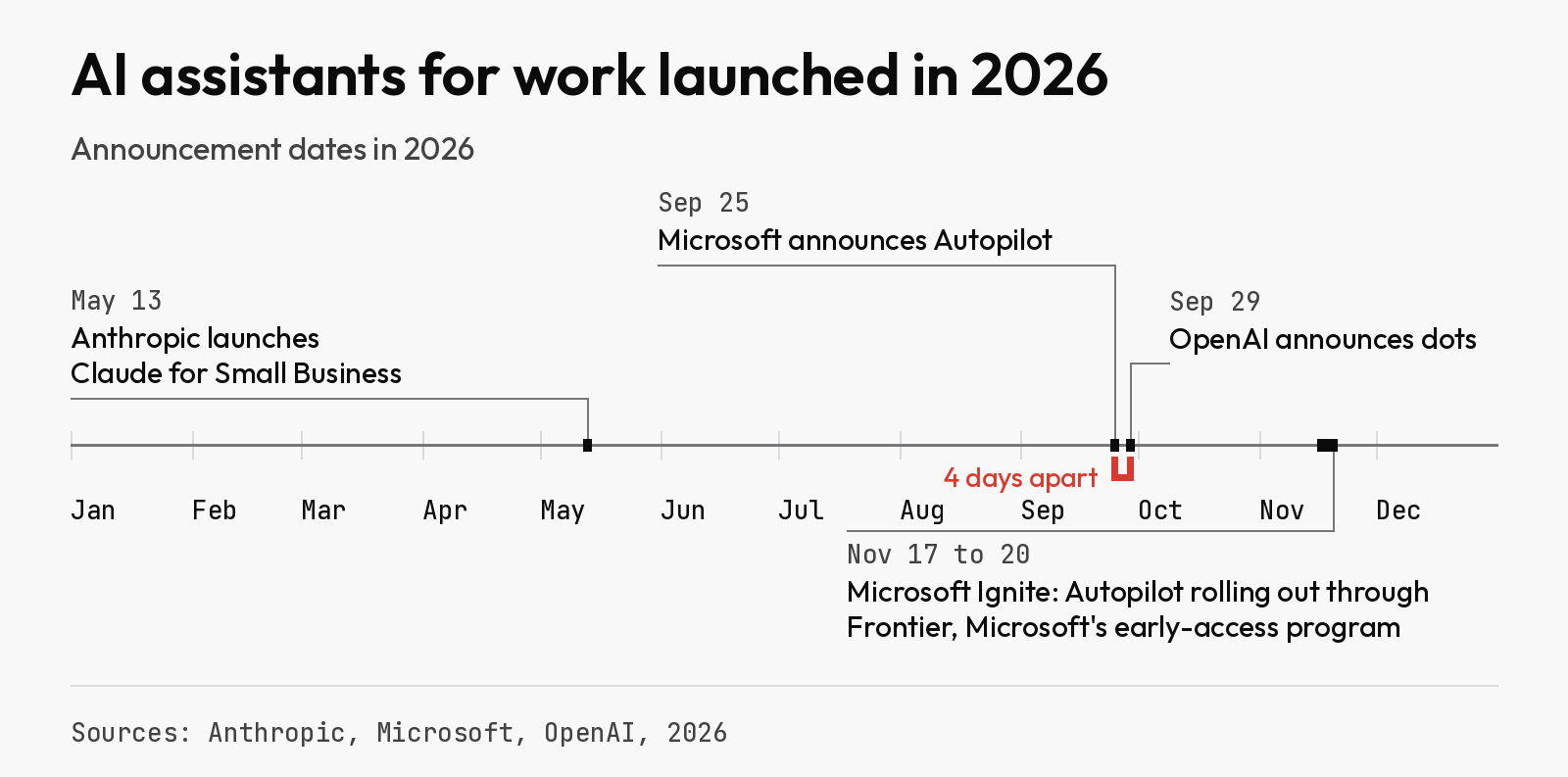
AI assistant launches aimed at work, 2026. Sources: Anthropic's Claude for Small Business announcement, Microsoft's Autopilot announcement, the Microsoft Ignite 2026 Book of News and OpenAI's dots announcement.
Microsoft's and OpenAI's launches came four days apart in late September, and both are still rolling out. Each is built around one agent that follows you through the whole working day. For most small businesses, we'd start smaller.
Why an agent with access to everything is hard to supervise
An assistant that can read your email, move your calendar, open your files and pay a bill needs your approval for all of it. When every request looks about the same, it gets easy to click yes without reading. The approval step is still there, but it can turn into a reflex.
It's also hard to tell whether a generalist did a good job. "Did the assistant help this week?" is a matter of opinion. "Did every web inquiry get a reply this morning?" has a yes or no answer.
Why one job per agent works better
With one job, success is easy to define. An agent that follows up on estimates either sent the follow-up or didn't, and you can count how many went out.
Its access shrinks too. That agent needs the inbox where estimates go and your customer list. It has no use for payroll or your bank login. Checking access is the first test before you switch an agent on: list every account it can reach, and remove anything its job doesn't use.
If it misbehaves, you can turn that one agent off while the rest of the business carries on, which is much harder with an assistant that runs everything.
Where the approvals go
Start with a simple rule: nothing goes to a customer, a public page or a payment system without a person's OK. Once an agent has handled a routine message well for a while, such as a note confirming you received an inquiry, you can let it send that one message on its own.
The major products all include approval controls. Anthropic's Claude for Small Business announcement puts it this way: "Claude does the work; you approve before anything sends, posts, or pays." OpenAI's dots have custom rules that allow an action, require approval for it or block it. Microsoft's line for Autopilot is "You set the objective and boundaries." Whatever you buy, the real decisions sit in those settings, and they're far easier to set well when each agent has one job.
What this means for your staff
In a Census Bureau working paper published in April 2026, 95.7% of AI-using firms reported no change in headcount caused by AI over the previous six months. The rest split almost evenly: 2.3% said AI led them to add staff, and 2.0% said it led them to cut.
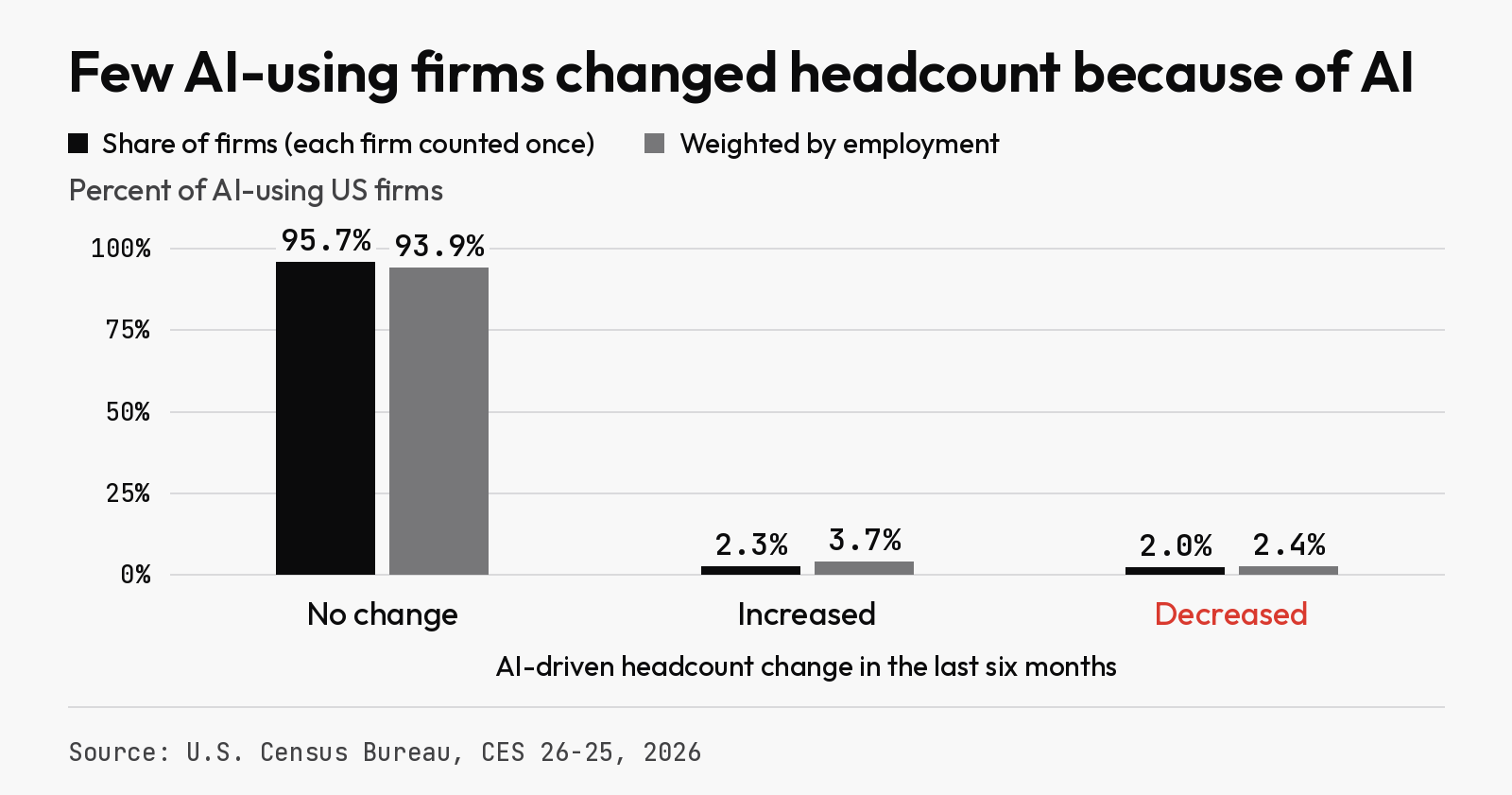
AI-driven headcount change at AI-using US firms, last six months, survey period November 2025 to January 2026. Source: U.S. Census Bureau, CES 26-25 (April 2026).
Weighted by employment, the picture barely moves: 93.9% of workers at AI-using firms were at a business that reported no AI-driven change. So aim the first agent at work nobody has time for now, such as the estimate nobody followed up on or the invoice nobody chased.
How we set up an agent's first job
When we build an AI agent team, we write down the first agent's job before anything gets connected. We sit with the people who do the work to find where the hours go. Then we agree on the job, what the agent may do on its own and what needs a person, and the measure we'll test it against. It runs on sample data first, goes live with a person reviewing its work, and only then do we add the next agent. Every automated step is logged, and one switch turns it off.
Written as one sentence, a first job looks like this: when a quote has gone a week without a reply, the agent drafts a follow-up in the shared inbox, and the office manager approves it before it's sent.
Next step
List the balls your team dropped last month, such as an estimate nobody followed up on or a missed call nobody returned. Pick the one that happens most often, write its job as one sentence, and make that your first agent. Our AI agent teams page shows how a build runs from there.
Frequently asked questions
What is an AI agent for a small business?
An AI agent is software that uses an AI model to carry out a task when something happens, such as replying to a new web inquiry or drafting a follow-up, working through the tools it's connected to. A chatbot waits for questions, while an agent acts on its own within limits you set. For a small business, a good first agent has one job, access only to the tools that job needs, and a person who approves what it sends.
Will AI agents replace my staff?
So far, few businesses report it. In the Census Bureau's April 2026 working paper, about 5% of AI-using firms reported any AI-driven change in headcount, while 16% had replaced existing software or equipment with AI. AI was changing their tools more often than their staff. We aim agents at work that's going undone, and a person stays in charge of anything that matters.
How do I choose the first job for an AI agent?
Pick a task that happens often, follows the same steps each time and gets dropped when the team is busy, such as replying to new inquiries or chasing unpaid invoices. You should be able to tell at a glance whether it was done. Skip jobs that depend on judgment you can't write down, and anything where a wrong answer could hurt a customer before a person sees it.
What should an AI agent never do without approval?
At the start, an agent shouldn't send anything to a customer, post anything in public, move money or change records other people rely on without a person's OK. You can relax that later, one routine message at a time, such as a reply confirming you received an inquiry. Some lines stay fixed. At a law firm, for example, nothing that amounts to legal advice should be automated.