Build vs buy software in 2026: a test for small business owners
Buy software for the jobs every business shares. Build where your way of working wins customers or your data is stuck, and score your tools before they renew.
Buy software when the job is one every business has, such as payroll, email or accounting, and a product your team likes already does it. Build when the way you do the work is what wins you customers, or when the data you need is stuck in tools that don't share it. Before each of your biggest tools renews, score it on two things: how well it fits the job and whether you can get your data out.
Start with the job the tool does
Before anyone names a product, write the job down in one sentence and say who does it. "Track every repair request from the first call to the invoice, for the office manager and the technicians" is a job. "We need a CRM" names a product category and skips the question of whether a CRM fits the work at all.
Then list where that job's data lives today: the apps, the spreadsheets and the inboxes. That list shows what any tool, bought or built, has to connect to.
Buy when the job is common and leaving is easy
Payroll, email, accounting and calendars work much the same way at every business. Mature products already handle them, along with the security fixes and updates you'd otherwise have to pay someone to keep up.
Buying is also safer when you could leave later without much pain. Before you sign, check that you can export all of your data in a standard format, such as a spreadsheet file, rather than finding out on the day you want to switch.
Build when the work is how you win, or the data is stuck
Custom software is worth a look when one of these is true:
- The way you work is what sets you apart, and the products on the market would make you work like everyone else.
- You pay for several subscriptions that don't share data, so someone copies records from one to another by hand.
- Your staff spend more time working around the software than working in it.
One sign is easy to count: the report someone rebuilds by hand every week. Each one is a job a tool could do if it could reach the data.
What AI changed, and what it didn't
AI coding tools make a first version faster to build, so testing an idea with a prototype is easier than it was. They don't make the code safe on their own. In Veracode's October 2026 AI code security update, which tested 18 AI models on coding tasks in four languages, the code they wrote passed security tests 62% of the time, up from 56% in July. In 38% of the tasks, it still contained a vulnerability.
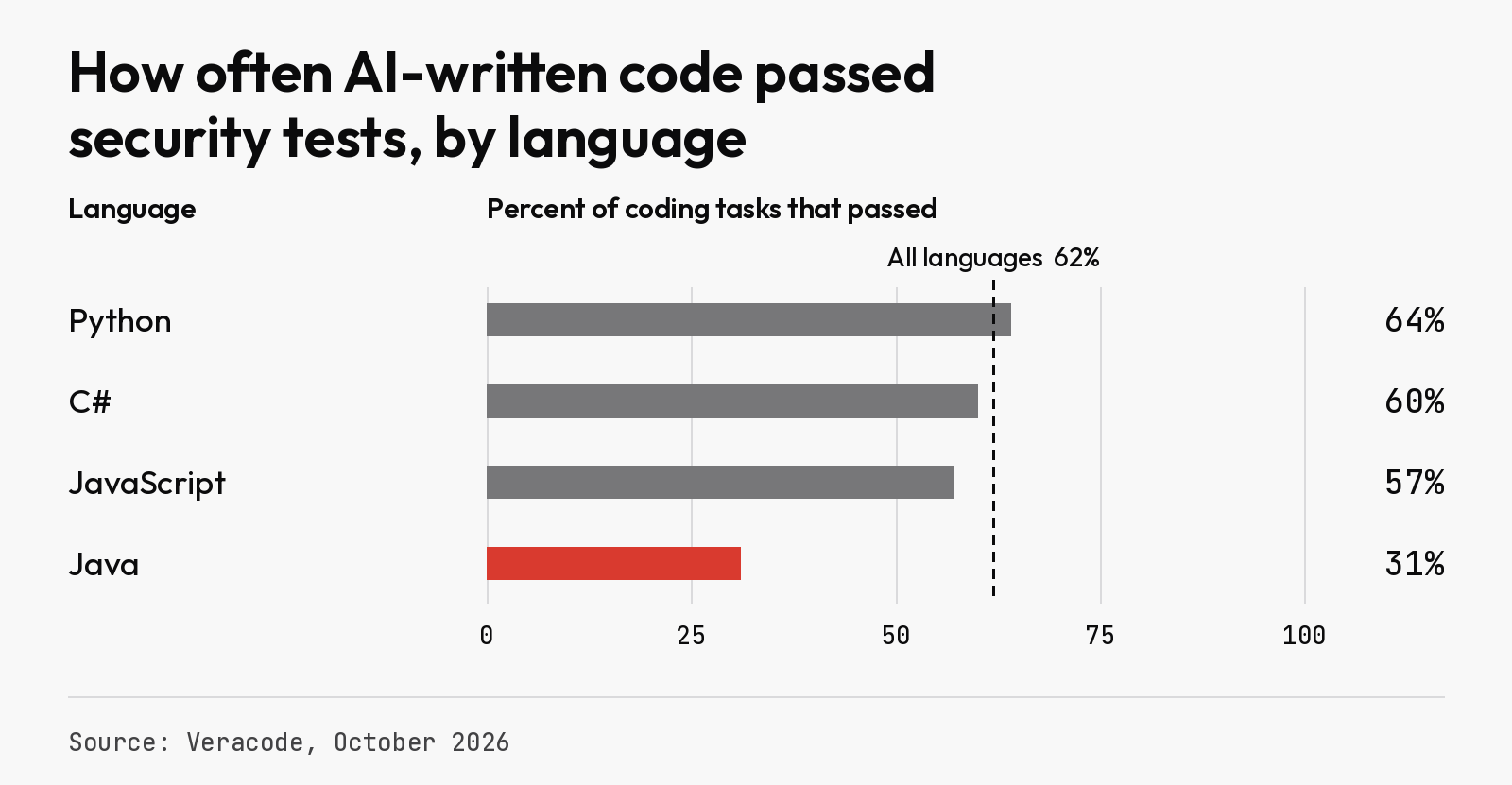
Share of AI coding tasks that passed Veracode's security tests, by language, October 2026. Source: Veracode (Oct 29, 2026).
Java lagged far behind the rest at 31%, against 64% for Python. Whoever writes your software, a developer or an AI tool, someone still has to review it for security and keep it updated after launch as the tools it connects to change.
Some firms are already swapping their tools for AI ones. In an April 2026 Census Bureau working paper, 16% of AI-using firms reported replacing existing software and equipment with AI-integrated tools.
Subscription costs are rising too
Renting software has its own risk, because the price can change at renewal. Zylo's 2026 SaaS Management Index, based on its customers' data, found that average SaaS spend rose 8% in a year while the average number of apps held steady at 305. Spending on AI-native apps rose 108%. Zylo also reports that 78% of IT leaders had unexpected charges in the past year tied to AI features or usage-based pricing.
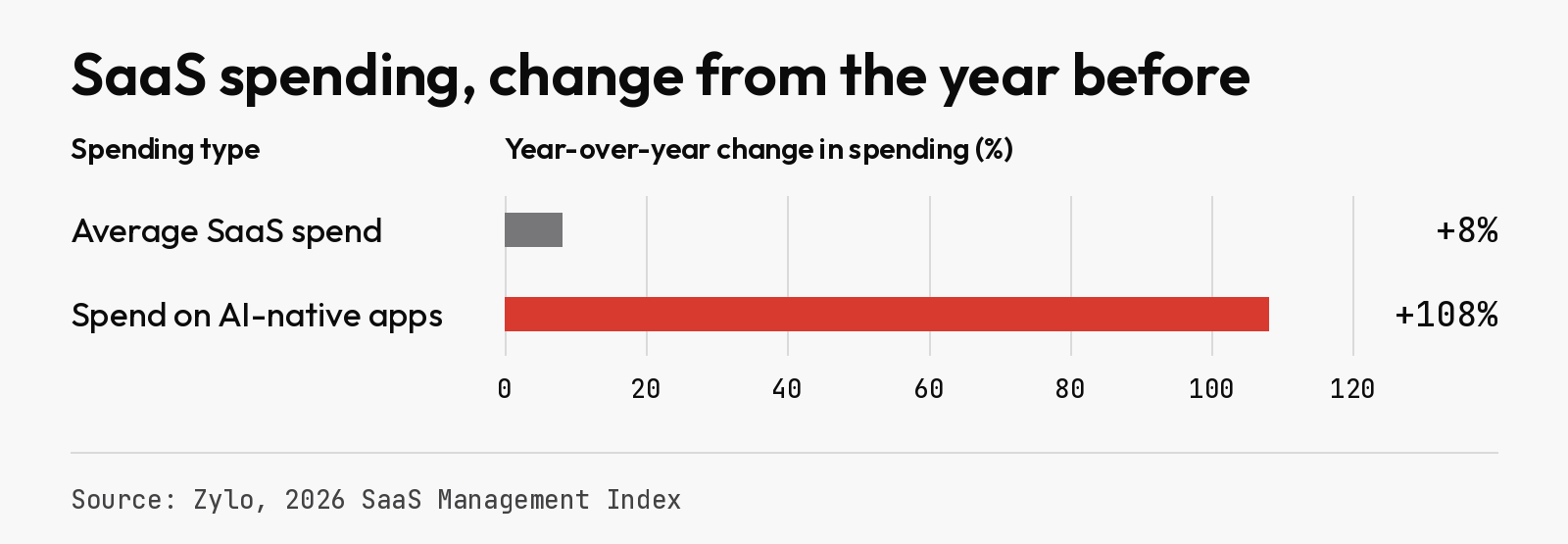
Year-over-year change in SaaS spending among organizations in Zylo's data, 2026 report. Source: Zylo, 2026 SaaS Management Index.
The organizations in Zylo's data spend an average of $55.7 million a year on SaaS, far more than a small business does, so read its numbers as a direction rather than a forecast of your bills. Price changes reach small businesses too. Microsoft's December 2025 Partner Center announcements included price increases for its commercial Microsoft 365 suites from July 1, 2026. Existing customers see the new prices at their first renewal after that date.
A middle path: build on top of what you already pay for
You don't have to replace a product to fix what it lacks. Keep the system of record, such as your accounting software or CRM, and build a thin layer on top of it. That might be a portal that shows each client their own records, a dashboard that pulls numbers from several tools into one view, or a connection that moves data between systems so nobody retypes it.
This works only when the product lets you reach your data, through an API or a reliable export. Check that before you plan anything.
Score your five biggest tools before they renew
A renewal is the point where you can change course without breaking a contract. Put your five biggest tools on one sheet before the next one comes up:
| Column | What to write |
|---|---|
| Tool and renewal date | The product and the date its contract or plan renews |
| Job | The job it does, in one sentence, and who does it |
| Fit, 1 to 5 | How well it does that job without workarounds |
| Data access, 1 to 5 | Whether you can get all of your data out, by export or API |
| Workarounds | The spreadsheets, copying and hand-built reports it leaves you with |
| Next step | Keep it, switch, or build on top of it |
A tool that scores well on both counts stays. One that fits poorly but opens up its data is a candidate for a layer built on top. Deal with poor data access first, because the more of your records a tool holds, the harder it is to leave.
How we decide whether to build
When a client asks us for custom software, the first phase is discovery: who will use the tool, what it must do and which systems it has to connect to. We quote discovery and the build as separate phases, so you know what each step costs before it starts. If an existing product does the job and your team likes it, we tell you to keep it.
When we do build, people who will use the tool click through a prototype of its screens before the build starts. The build runs in short cycles, with a working demo at the end of each, and you own the code, the hosting and the data.
Next step
List your five biggest tools with their renewal dates, and score each one on fit and data access before it renews. If a tool scores low on both, or your team keeps rebuilding the same report by hand, our custom software page explains how we scope a replacement or a layer on top.
Frequently asked questions
Is it cheaper to build or buy software?
Neither is cheaper as a rule, because the answer depends on how long you'll use the tool and how much your team works around it. Buying spreads the cost over subscriptions whose price can change at each renewal. Building puts more of the cost up front and adds upkeep every year. Compare both over the years you expect to keep the tool, and count the staff hours spent on workarounds as part of the cost.
What is the difference between custom software and SaaS?
SaaS is software you rent by subscription, the same product the vendor sells to every other customer. Custom software is built for one business. With SaaS, the vendor sets the features, the price and how you get your data out. With custom software, you decide those things and pay for its upkeep. Who owns custom code depends on the contract, so ask before you sign.
What should I check before a software subscription renews?
Check what you'll pay after the renewal and what changed in the plan, how many seats people still use, and whether you can export all of your data. If the contract renews on its own, note the last day you can cancel and put a reminder on the calendar a month before it, so you have time to compare options. Then ask whether a smaller plan covers what your team uses.
Can I build my own business software with AI tools?
You can build a working prototype, and that's a quick way to learn what you need. Before staff or clients rely on it, have someone who can read the code check how it handles sign-in, who can see which records, how it's backed up, and what happens when a tool it connects to changes.