GivingTuesday donation page checklist: fix these before Dec 1
GivingTuesday is Dec 1, 2026. In M+R's benchmarks, 8% of mobile visitors to a main donation page gave, against 11% on desktop. Test yours on a phone first.
Before GivingTuesday on Dec 1, make one full test gift on a phone, over a cellular connection, starting from the link you'll send donors. Then check the page's speed, its form fields and the receipt email, and fix only what stops or slows a gift. Save design changes for January.
Why to test on a phone first
Phones and tablets bring most of the visits to nonprofit websites and a smaller share of the gifts. In the 2026 M+R Benchmarks Study, which covers 2025, mobile devices made up 52% of visits but 43% of donation transactions and 28% of online revenue.
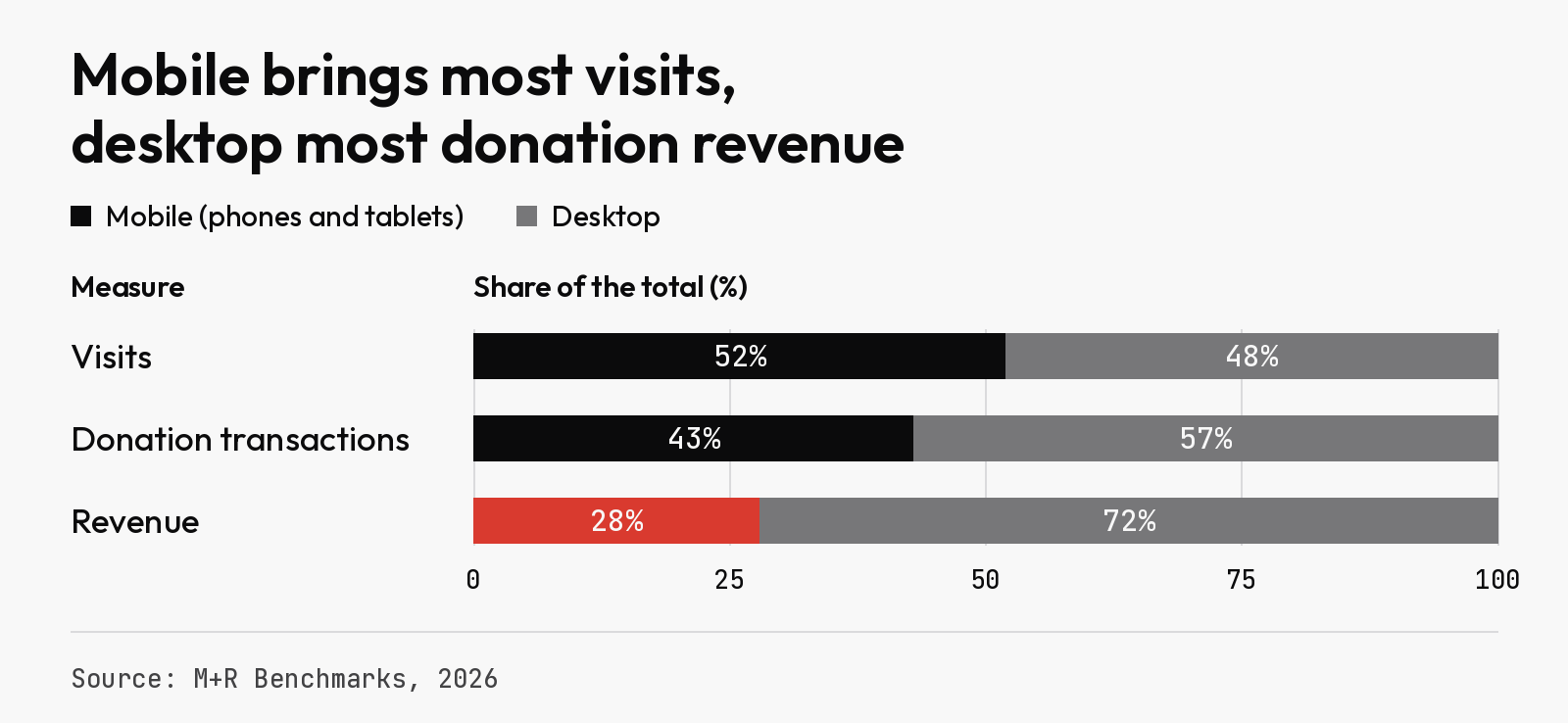
Share of nonprofit website visits, donation transactions and revenue, by device, 2025. Source: M+R Benchmarks 2026.
The gap shows up on the donation page itself. Of the visitors who reached a nonprofit's main donation page, 11% completed a gift on desktop and 8% on mobile. At small nonprofits, only 4% of mobile visitors gave. The average gift was smaller on mobile too, $88 against $168 on desktop.
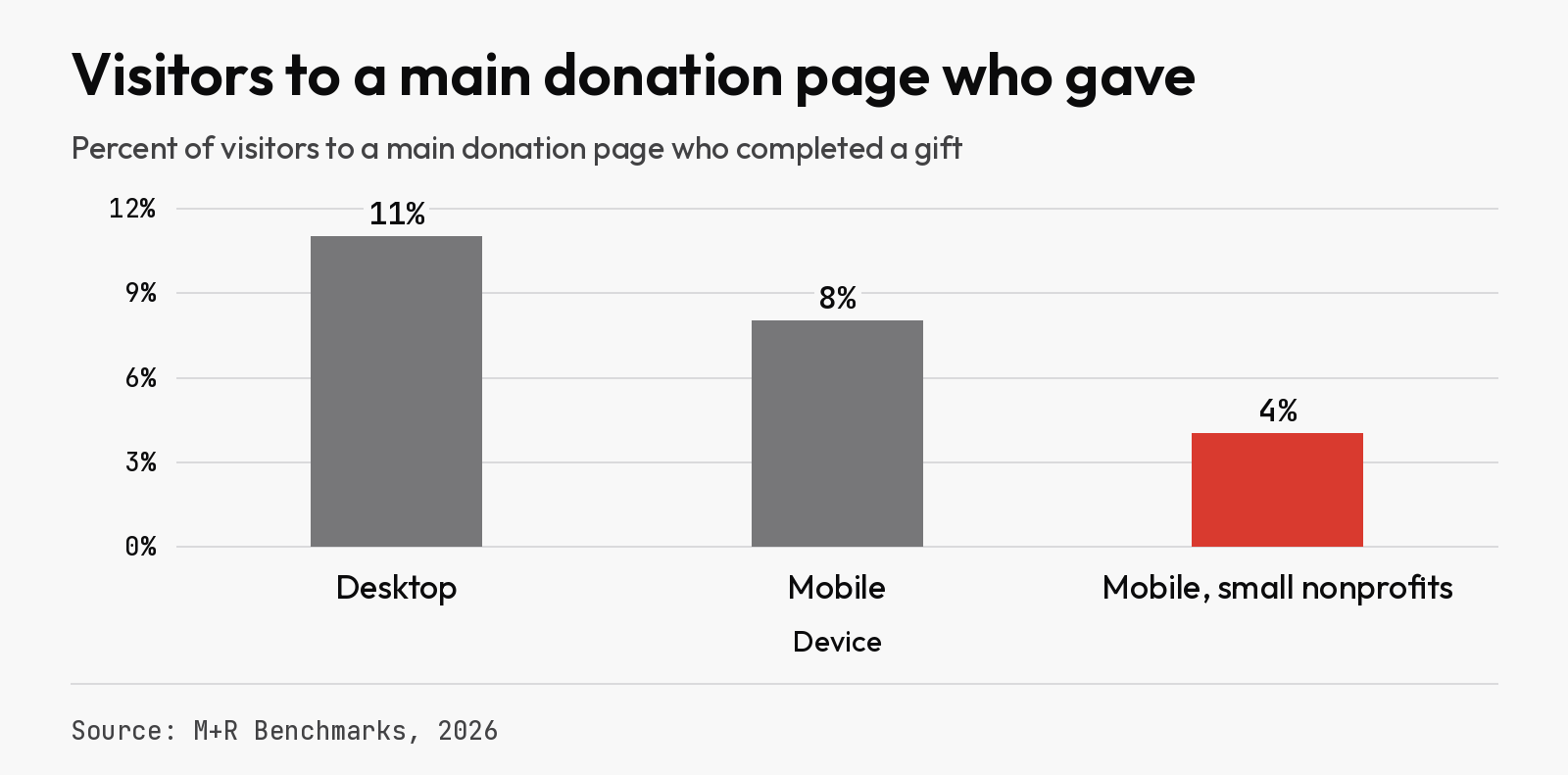
Share of visitors to a main donation page who completed a gift, by device, 2025. Source: M+R Benchmarks 2026.
M+R's page doesn't say what causes the gap. Whatever the cause, mobile devices bring the most visits in M+R's data, so a broken button or a slow page on a phone reaches the most people. Test there first.
Make a full test gift on a phone
Turn on your donation platform's test mode, if it has one, or make a small real gift and refund it afterward. Use a phone on cellular data rather than office Wi-Fi, and start from the link in your GivingTuesday email or social post, since that's the path donors will take. Check that:
- The link opens the right page, with the campaign's name on it.
- The amount buttons, the monthly option and any tribute fields work with a thumb.
- Each payment option you offer goes through, on an iPhone and on an Android phone if you can borrow one.
- The thank-you page loads, and the receipt email arrives.
Check the page's speed on mobile
Speed is a common weak spot on phones. In the HTTP Archive's 2025 Web Almanac, 48% of mobile websites passed all three of Google's Core Web Vitals, against 56% on desktop.
Run your donation page through PageSpeed Insights and read the mobile results. M+R now uses the same tool to measure the speed of nonprofit homepages and donation pages. If PageSpeed Insights shows data from real visitors, look first at Interaction to Next Paint, which measures how quickly the page responds when someone taps it. Google counts 200 milliseconds or less as good and more than 500 as poor.
This close to the day, fix only what's quick and safe, such as an oversized image at the top of the page. Before you remove a script the page doesn't need, check with whoever manages your analytics, so you don't lose the day's tracking.
Label every field, and don't ask for anything twice
Every field needs a visible label. Placeholder text inside a box doesn't count, because it disappears as soon as the donor starts typing. WCAG 2.2, the current version of the W3C's accessibility guidelines, covers this in its Level A criterion Labels or Instructions.
WCAG 2.2 added nine criteria to version 2.1. One of them, Redundant Entry, says information a person already gave earlier in the same process should be filled in for them or offered as a choice, with a few exceptions, such as information needed for security. On a donation form, a "same as billing address" checkbox is a common fix.
Mark name, email and address fields with the standard autocomplete attributes too, which let a phone fill them in and meet WCAG's Identify Input Purpose criterion. And make the amount buttons and checkboxes easy to tap: WCAG 2.2 sets a minimum target size of 24 by 24 CSS pixels, with some exceptions.
Cut the fields you don't need this week
Every field is one more thing to type on a phone. Look at each optional field, such as a phone number, a title or "how did you hear about us," and hide the ones your staff never use. Keep what your receipts and records require, and check with your finance lead before you remove anything.
Check the receipt email on a phone
The receipt email is the donor's record of the gift. Open it on a phone and check that it arrived, that the sender name is one donors will recognize, and that it shows the gift amount, the date and your organization's name. Make sure it includes what your finance team says a receipt needs, and look in the spam folders of a Gmail address and an Outlook address too.
Save design changes for January
In the last days before a campaign, our rule is to fix only what stops a gift: a broken button, a field that won't accept what people type, a payment option that fails or a receipt that doesn't send. Everything else goes on a list for January, when there's time to change the page and test it properly.
How we set up giving on the sites we build
On the nonprofit sites we build, giving is set up during the build, along with the site's other forms, analytics and redirects. Before launch, we test every page on phones and computers. We build and check every site against WCAG 2.1 AA, and we don't use overlay widgets, because accessibility has to go into the code and the content.
Next step
Make one test gift on your phone before Tuesday, over cellular data, from the link you'll send donors. Fix anything that stops it, and start the January list with everything else. Our nonprofit websites page shows how we build giving into a site.
Frequently asked questions
When is GivingTuesday 2026?
GivingTuesday 2026 is Tuesday, Dec 1, according to GivingTuesday's site. It falls on the Tuesday after Thanksgiving in the US each year. Donors will be clicking your email and social links throughout the day, so finish your test gift and your fixes before Tuesday morning, and keep someone on hand that day who can check the page if a donor reports a problem.
What percentage of nonprofit website visitors donate?
In the 2026 M+R Benchmarks Study, 1.6% of all visitors to nonprofit websites made a donation in 2025, and nonprofits brought in an average of $1.33 per visitor (M+R). Visitors to hunger and poverty nonprofits gave most often: 3.3% donated, for $5.58 per visitor. To compare your own site, use the same two measures in your analytics over a full year.
Which payment options should a donation page offer?
Cards, plus the digital wallets your donors already use. In the 2026 M+R Benchmarks Study, 79% of nonprofits offered PayPal on their main donation page, 58% offered Google Pay, 57% Apple Pay and 44% Venmo (M+R). This close to Dec 1, test the options you already have on a phone instead of adding a new one, and add others in January if donors ask for them.
How fast should a donation page load?
Its main content should appear in under 2.5 seconds, the line the 2025 Web Almanac uses for a good Largest Contentful Paint, one of Google's Core Web Vitals. In 2025, 62% of mobile sites met it, against 74% of desktop sites (Web Almanac). PageSpeed Insights shows your page's real-visitor numbers on its mobile tab when the page gets enough traffic to measure.